Digital security is now a fundamental part of professional computing, particularly in organisations handling confidential information, identity verification, financial records, and controlled-access systems. Smart card technology provides an additional layer of authentication, while a keyboard with an integrated card reader can simplify the process by combining everyday typing with secure credential access. For French-speaking workplaces, choosing equipment with a familiar AZERTY arrangement can also improve efficiency, reduce typing errors, and support a more consistent user experience.
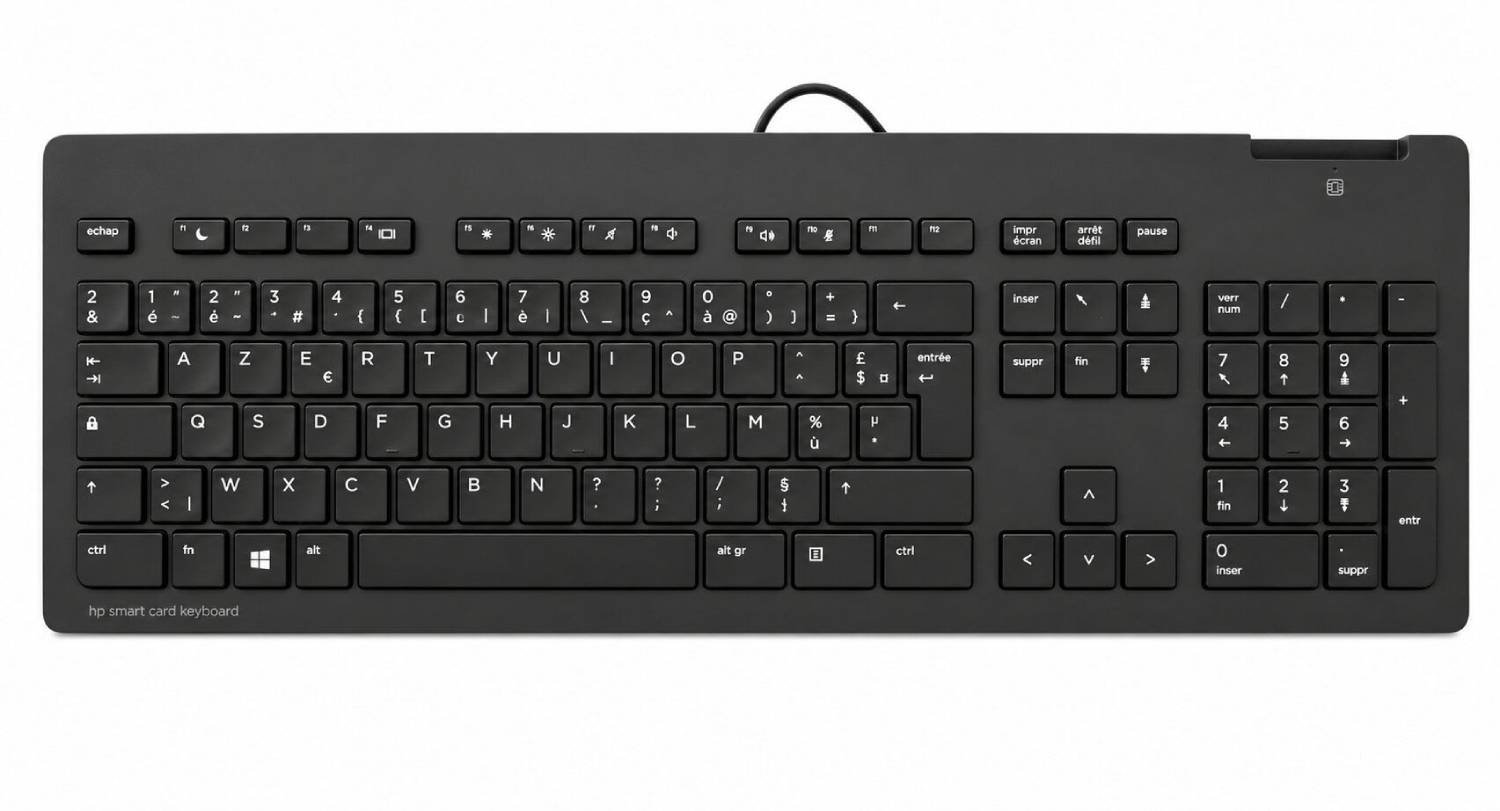
The HP Smart Card Keyboard brings these functions together in a single professional peripheral. Combining a French layout with CCID smart card functionality, it can support environments where users need both conventional keyboard operation and smart card authentication. This type of hardware is particularly relevant to businesses, public-sector organisations, financial services, educational institutions, and other workplaces where controlled access and dependable computer peripherals are important.
Understanding CCID Smart Card Technology
CCID stands for Chip Card Interface Device, a standard used for communication between smart card readers and computers. A CCID-compatible keyboard can therefore provide a convenient interface for compatible smart cards without requiring a separate external reader on the desk.
Smart cards can contain credentials or certificates used for authentication, identification, digital signatures, or access to protected systems. The keyboard itself does not replace an organisation’s security policies or authentication software, but it can provide the physical interface required by a compatible security environment.
This makes integrated smart card peripherals particularly useful in workplaces where authentication forms part of everyday computer access.
For French-speaking users, a Smartcard Security keyboard with French layout combines this authentication-oriented functionality with a familiar AZERTY typing arrangement. This can help employees avoid adjusting to an unfamiliar keyboard while carrying out routine administrative or security-related tasks.
Why the French AZERTY Layout Matters
Keyboard layout has a direct influence on typing speed and accuracy. French AZERTY keyboards place commonly used letters, punctuation marks, and symbols differently from QWERTY layouts. Employees who regularly type in French are therefore more productive when their physical keyboard corresponds with their established typing habits.
Benefits of a familiar layout include:
- Faster access to commonly used French characters
- Reduced typing errors caused by unfamiliar key positions
- Easier document preparation and communication
- More comfortable everyday computer use
- Consistency across office workstations
For organisations with French-speaking teams, standardising the keyboard layout can also simplify equipment deployment and employee onboarding.
Security and Everyday Productivity Together
A major advantage of an integrated smart card keyboard is its ability to combine two important functions within one device. Users can perform normal computer tasks while having access to a compatible smart card reader positioned directly within the keyboard.
This can help keep desks organised by reducing the number of separate peripherals required. It may also make authentication routines more straightforward for employees who regularly use smart cards as part of their workflow.
However, organisations should always verify compatibility with their existing smart cards, operating systems, drivers, authentication applications, and security infrastructure before purchasing. Hardware compatibility is essential for a successful deployment.
Features Worth Considering
When selecting security-focused keyboards, businesses should assess more than the presence of a smart card reader. Build quality, layout, visibility, connectivity, and compatibility all influence the long-term user experience.
Important considerations include:
- CCID compatibility with the intended system
- French AZERTY keyboard arrangement
- Reliable connection to the host computer
- Comfortable key spacing for regular typing
- Durable construction for workplace use
- Compatibility with required smart cards and applications
A careful technical assessment before deployment can prevent avoidable compatibility problems.
Accessibility and Clear Key Visibility
Although security is the primary consideration for a smart card keyboard, visibility should not be overlooked. Employees with reduced eyesight may benefit from clear key legends and an uncluttered arrangement.
High Visibility Keyboards and High Contrast Keyboard designs can be particularly useful where users need stronger differentiation between characters. Similarly, an Oversized Letter for Visually Impaired Low Vision Seniors approach may support users who find conventional lettering difficult to read.
Accessibility should form part of an organisation’s wider equipment policy. Providing appropriate peripherals can help employees work more independently while creating a more inclusive digital environment.
Where Smart Card Keyboards Can Be Used
Integrated smart card keyboards have applications across numerous professional sectors. Government departments may use smart cards for identity and access control, while financial organisations can require secure authentication for sensitive systems. Healthcare and educational environments may also use credential-based access depending on their technical infrastructure.
Potential workplace applications include:
- Secure employee authentication
- Digital certificate access
- Identity verification
- Protected corporate systems
- Digital signing workflows
- Controlled-access workstations
The exact application depends on the organisation’s security architecture and the smart card technology being used.
Setting Up a Secure Workplace
Installing security hardware should form part of a broader IT security strategy. Organisations should keep operating systems and security applications updated, restrict access to authorised users, and establish clear procedures for issuing, using, and storing smart cards.
Employees should also understand that a smart card is a security credential and must be protected appropriately. Technical controls work best when supported by sensible user policies and regular staff awareness training.
Secure Typing Ahead
An integrated smart card keyboard can bring security, convenience, and familiar French typing into one professional workstation accessory. By combining CCID functionality with an AZERTY arrangement, it can support organisations that require dependable authentication alongside everyday productivity. Before choosing a model, businesses should confirm smart card, software, operating system, and connectivity compatibility. With appropriate deployment and security practices, the right equipment can help create a more efficient workplace while supporting secure access and comfortable daily computer use.